How to Sign Up for Pampers Rewards Scan Diapers Stack Grocery Coupons and Redeem Vouchers
Diapers disappear fast, and the cost adds up even faster. Pampers Rewards, through the Pampers Club app, can help you turn diaper and wipe purchases into small savings over time. Pair those rewards with grocery store deals and coupons, and each box can cost a little less.
Here is a short, practical breakdown of how to sign up, scan Pampers codes, stack coupons the right way, and redeem Pampers vouchers without making the process harder than it needs to be.
Start by signing up for Pampers Rewards
The first step is creating an account in the Pampers app or on the Pampers website, depending on what is available in your area. In the U.S., the program is commonly tied to the Pampers Club app.

Here is the basic setup:
Download the Pampers Club app
Search for the Pampers app in the Apple App Store or Google Play Store. Make sure it is the official app from Pampers or Procter & Gamble.
Create your account
Use an email address you check often. Pampers may send reward updates, coupon offers, or account notices there.
Confirm your email if prompted
Some accounts require email verification before rewards or scans fully work.
Add basic profile details
The app may ask about your child’s age or diaper size. This helps show more relevant offers, but only add what you are comfortable sharing.
Check the rewards section
Look for areas labeled `Rewards`, `Pampers Cash`, `Scan`, `Wallet`, or `Offers`. App wording can change, but the idea is the same.
Tip: Sign up before throwing away diaper packaging. The reward code is usually on or inside eligible Pampers diaper and wipe packs.
Scan diaper and wipes codes before you toss the packaging

Once your account is ready, scan the Pampers codes from eligible products. This is where the reward balance starts to build.
The exact location of the code can vary by product type and package style. Check:
Inside diaper boxes
On the inner flap of diaper packaging
Under or near the seal on wipe packs
Printed inserts inside some packages
To scan:
Open the Pampers app.
Tap the scan or rewards option.
Allow camera access if the app requests it.
Line up the code in good light.
Submit the scan and wait for confirmation.
If the scan fails, enter the code manually if the app gives that option. Double-check characters that look alike, such as `O` and `0`, or `I` and `1`.
A few simple habits make this easier:
Scan codes right after opening a new pack.
Keep unscanned inserts in one drawer or basket.
Do not wait too long, since program rules and eligible codes can change.
Check the app for limits, expiration rules, and eligible products.
The goal is not to make diaper buying feel like a full-time job. Scan while putting diapers away, then move on.

Stack grocery coupons without breaking coupon rules
This is where many shoppers save the most. Pampers Rewards can help, but grocery store deals often create the bigger discount, especially when you combine them correctly.
Coupon stacking means using more than one type of savings on the same purchase when store policy allows it. The key phrase is when store policy allows it.
A common stack might include:
Savings type | How it works |
Store sale | The grocery store lowers the shelf price for the week. |
Store digital coupon | A coupon loaded to your store loyalty account. |
Manufacturer coupon | A Pampers or P&G coupon, paper or digital. |
Rewards voucher | A Pampers reward you redeem and use according to its terms. |
Cash-back app offer | A separate rebate after purchase, if eligible. |
The safest rule is this: do not use two manufacturer coupons on the same item unless the terms clearly allow it. Many Pampers coupons are manufacturer coupons, even when they appear in a grocery app. A store coupon and a manufacturer coupon may stack, but two manufacturer coupons usually do not.
Before checkout, read the fine print:
Does the coupon require one box, two packs, or a certain size?
Is it for diapers only, wipes only, or both?
Does it exclude trial sizes?
Does it expire soon?
Can it be used with other offers?
Does your store allow digital and paper coupons together?
For example, a simple clean stack could look like this:
Buy a Pampers diaper box that is on sale.
Clip the store’s digital coupon if it is a store coupon.
Use one eligible Pampers manufacturer coupon or voucher.
Submit the receipt to a cash-back app only if the offer matches and allows other coupons.
That is a smart version of How to Sign Up for Pampers Rewards Scan Diapers Stack Grocery Coupons and Redeem Vouchers in real life: sign up, scan, buy during a sale, apply the right coupon, then redeem rewards carefully.
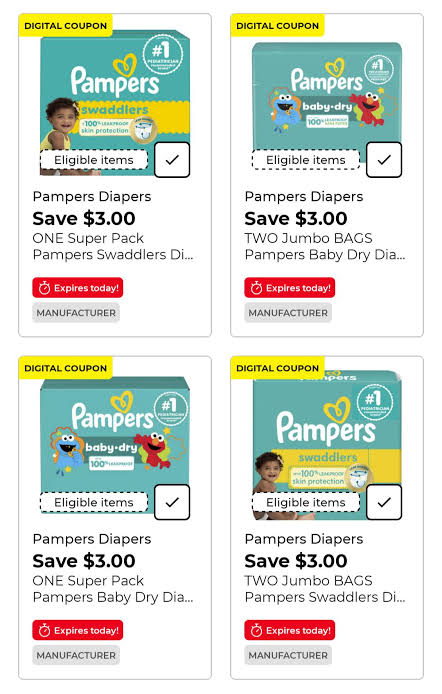
Redeem Pampers vouchers the right way
After you scan enough eligible products, your account may show rewards you can redeem. These can vary by time and location. Depending on the current program, you might see coupons, vouchers, gift card options, sweepstakes entries, or partner offers.
To redeem a Pampers voucher:
Open the Pampers app.
Go to the rewards or wallet area.
Choose the voucher or coupon you want.
Read the offer terms before selecting it.
Redeem it only when you are ready to use it, if it has a short expiration window.
Save, print, or load the voucher as instructed.
Use it at checkout according to the terms.
Be careful with timing. Some digital vouchers expire soon after you activate or claim them. If you redeem one while sitting at home with no shopping trip planned, you may lose it before you use it.
Also check where the voucher works. Some may be accepted broadly. Others may be tied to certain retailers, product sizes, or purchase amounts.
Use a simple diaper savings routine
The easiest system is the one you can repeat while tired, busy, or holding a baby. Try this routine:
When you open diapers
Scan the Pampers code right away. Toss the packaging only after the app confirms the scan.
Before grocery shopping
Check your store app for Pampers sales and digital coupons. Look at Pampers Rewards to see if any vouchers are worth redeeming.
At the store
Buy the exact size and product listed in the coupon terms. Small product differences can cause coupons to fail.
After checkout
Save the receipt until all rebates, cash-back offers, and reward issues clear.

A quick example of a Pampers savings plan
Say a grocery store runs a weekly sale on a large Pampers box. Before shopping, you clip a store digital coupon in the grocery app. Then you choose one eligible Pampers manufacturer coupon or voucher, making sure the terms match that exact box.
At checkout, the store sale comes off first. The store coupon applies if eligible. The manufacturer coupon or voucher applies once. Afterward, you scan the new diaper code in the Pampers app and keep building your reward balance for next time.
That is the cycle:
Buy diapers during a good sale.
Use allowed coupons.
Scan the Pampers code.
Redeem rewards when they are useful.
Repeat when you need the next box.
The main takeaway
Pampers Rewards works best as part of a simple coupon routine. Sign up once, scan every eligible diaper and wipes code, watch for grocery store sales, and redeem vouchers only when you are ready to use them.
The savings may not cover every diaper run, but steady scanning and smart coupon stacking can take the edge off a regular household expense.
If you need somewhere to breakdown your family budget, consider my digital budget planner that you can print at home!


Comments